How to cancel Easy PHP hosting

Need to cancel your Easy PHP hosting plan? Whether you're changing to a different plan or provider, or just retiring a website, this guide will show you how to cancel your hosting subscription.

1
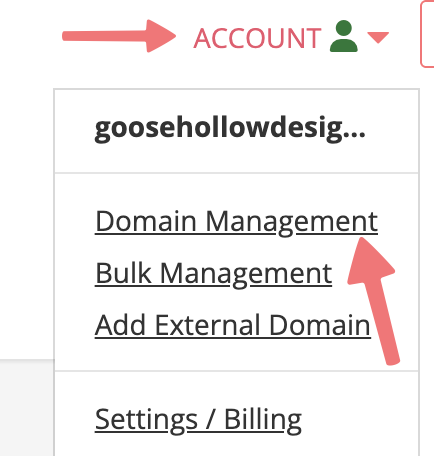
Log in. This should take you to the Domain Management screen. If you're already logged in, click on ACCOUNT in the top right, and select Domain Management.

2
Locate the domain you're cancelling Easy PHP hosting for. To the right of the domain name, click on the PHP icon, under the "WEBSITE" column.

3
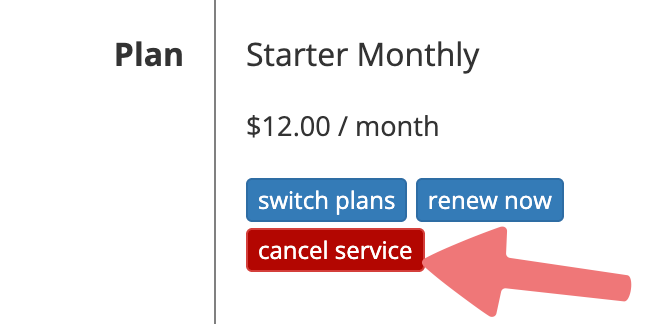
You'll be taken to the Easy PHP hosting dashboard for your domain. Scroll down to the "Plan" section, then click on the "cancel service" button.

4
A window will appear asking you if you would like to cancel your subscription. Click the "Yes, cancel my subscription" button.

That's it! You'll be taken to a "Pending Retirement" page while our system cancels the hosting plan. Once that's done, you can set up a new hosting plan from Porkbun on your domain, or you can return to your Domain Management page and confirm that the Easy PHP hosting icon no longer shows up next to your domain.

Feel free to get in touch with our support team if you need any assistance managing your Easy PHP hosting.

Did this answer your question? Thanks for the feedback There was a problem submitting your feedback. Please try again later.