How to Transfer a Domain from Network Solutions to Porkbun
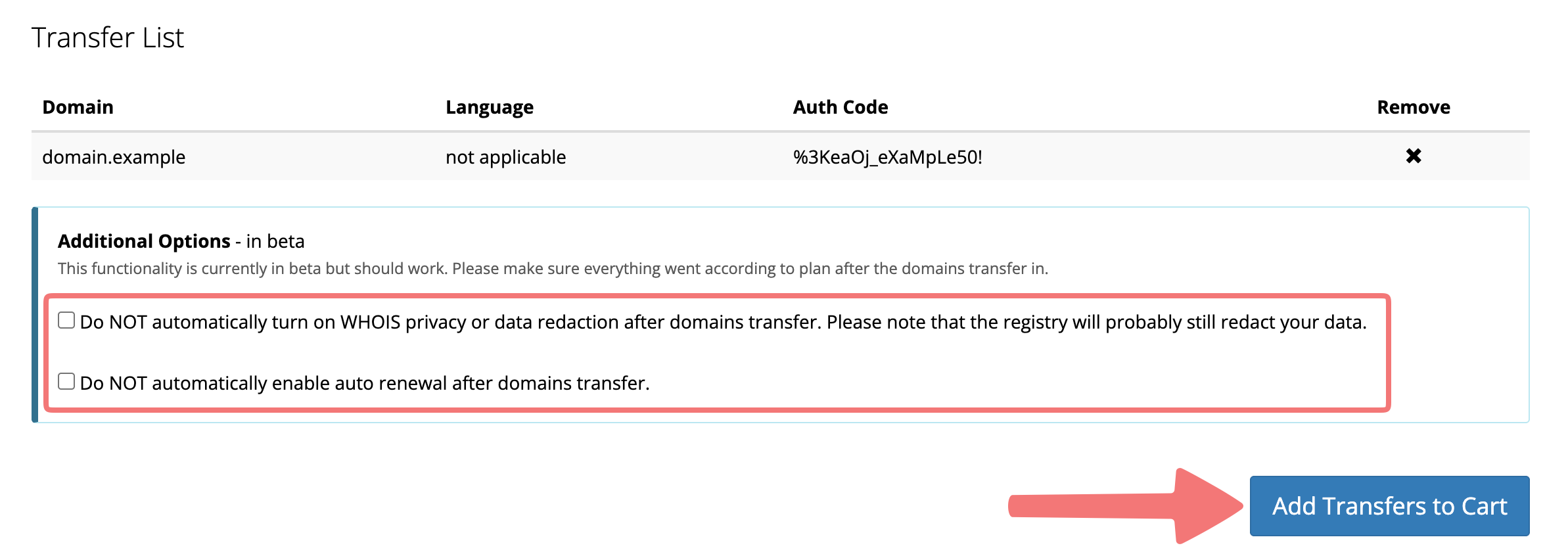
Transferring a domain can seem intimidating, but we're here to help. We'll show you how to transfer your domain from Network Solutions to Porkbun. Let's do it!
Steps to transfer a domain from Network Solutions

Warning
If you have an existing live website, email service, or other DNS service set up on your domain, be aware that you might need to perform extra steps to ensure your site does not go down when the transfer completes. This guide explains more.

You can refer to our guide on what various transfer statuses mean to make sure your transfer is processing successfully.
Can I speed up my transfer?
Once the transfer is processing successfully (you can review info on checking transfer statuses here), you can typically expect to wait between 5-7 days for the transfer to complete. However, some registrars will allow you to expedite the transfer, either directly from your account or by approving the transfer via email.
Our recommendation is to wait for an email from Network Solutions to see if they will allow you to "approve" the transfer, which will get it to go through more quickly. If you don't receive that email, you may need to wait the full 5-7 days for the transfer to complete, or you can try contacting the Network Solutions support team to request that the transfer be expedited.
Possible issues when transferring a domain
- Was your domain first registered fewer than 60 days ago? If so, you’ll need to wait until the 60-day mark before transferring it to Porkbun. We feel your pain, but our hands are tied.
- Was your domain transferred fewer than 60 days ago? Same deal as above. ICANN rules say a domain must stay at one registrar for 60 days before it can be transferred to another.
- Did your domain expire recently, or is it about to expire? If it’s close, you may want to renew your domain at Network Solutions first before transferring it to Porkbun to prevent any interruption of service. You can always contact the Network Solutions support team to confirm whether or not your domain will transfer to another registrar successfully.
- Additionally, if you renew an already-expired domain at Network Solutions, then transfer the domain to Porkbun within 45 days, your registration may not be extended for an additional year. For more information, check out our guide "Do I Lose Domain Registration Time If I Transfer Domains?".
- Does your domain already have more than nine years of registration? Since domains can only ever have ten years of registration at a maximum (at one time, that is) sometimes the registry won't allow transfers that already have nine years of registration.
We're thrilled to have you join us at Porkbun! Please feel free to get in touch with our support team if you run into any issues transferring your domain from Network Solutions to Porkbun.